
1.0 KiB
1.0 KiB
Rotate
Use the <rotate> tag to rotate each character about its center. Specify the amount of rotation in degrees. Positive values rotate characters counter-clockwise. Negative values rotate them clockwise.
Rotation affects the spacing between characters, and may cause characters to overlap in some cases. Use the <cspace> tag to correct character spacing as needed.
Example:
Rotate text <rotate="-10">counter-clockwise</rotate> or <rotate="10">clockwise</rotate>

Text rotated counter-clockwise (left) and clockwise (right)
Rotate text <rotate="45">counter-clockwise</rotate>

More rotation makes it more likely that characters overlap
Rotate text <cspace="15"><rotate="45">counter-clockwise</rotate></cspace>
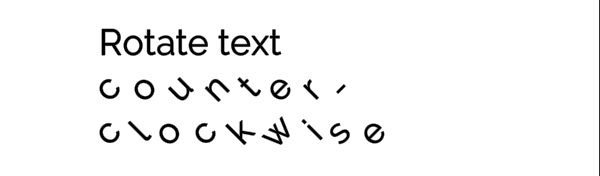
The <cspace> tag adjusts character spacing, and can help correct overlap caused by rotation