2.5 KiB
Change the behavior of a Sub Graph with a dropdown
To set up a Sub Graph so you can change its behavior using a dropdown menu in shader graphs, use a Dropdown node. You can specify the number of options that appear in the dropdown menu, and their names.
Create a dropdown
Follow these steps:
-
From the Project window, open a Sub Graph asset.
-
In the Blackboard, select Add (+), then select Dropdown.
Note: The Dropdown property appears only in the Blackboard for Sub Graphs, not regular shader graphs.
-
Drag the new Dropdown property from the Blackboard to the Sub Graph. Unity creates a Dropdown node.
When you add the Sub Graph to a shader graph, the Sub Graph node now has a dropdown menu with A and B options.
Customize the dropdown options
To customize the options in the dropdown menu, follow these steps:
- In the Sub Graph, select the Dropdown property in the Blackboard window.
- In the Graph Inspector window, select the Node Settings tab.
- Next to Entries, select the Add (+) button to add a new option, or the Remove (-) button to remove an option. The minimum number of options is two.
Each option you add adds a corresponding input port to the Dropdown node.
Set up the output for each option
To set up the output for each option in the dropdown menu, follow these steps:
- Connect a node or set of nodes to each input port on the Dropdown node. Each input becomes active when the corresponding option is selected in the dropdown menu.
- Connect the Out port to the Output node.
Each input port has the Dynamic Vector type, which allows you to connect any Vector type. For more information, refer to Dynamic Data Types.
Example
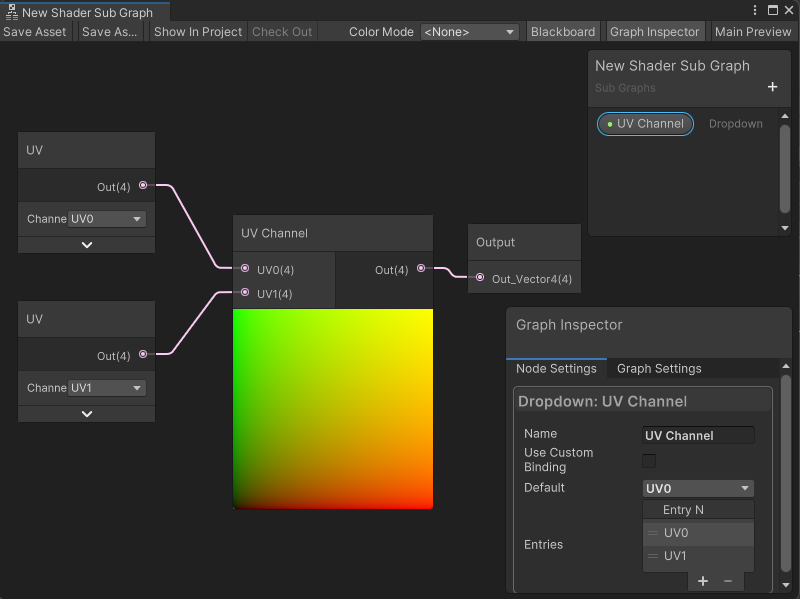
In the following example, a Subgraph Dropdown node changes the UV channel it sends to the Subgraph's Output node. The selection on the Subgraph node in the parent graph changes whether the Subgraph outputs UV1 or UV0. If the Subgraph is used in multiple Shader Graphs, the Subgraph Dropdown node can change the UV channel output without changing the Subgraph: